How to Enable PHP Optional Modules: Complete Guide for Developers

Are you looking to enhance your PHP development setup? Learning how to enable PHP optional modules is important for unlocking advanced functionalities such as database management, image manipulation, and secure data encryption. This guide provides step-by-step instructions, troubleshooting tips, and real-world applications for developers and system administrators. Before enabling modules, it helps to have your PHP version itself under control, see managing PHP versions with Laravel Herd.
Enabling PHP optional modules not only enhances your application’s performance but also allows you to utilize a variety of tools and libraries customized to your project’s needs. Whether you're working on a content management system, an e-commerce platform, or a custom web application, activating the right modules can streamline development and improve functionality. Understanding these modules empowers developers to customize their PHP environment, ensuring compatibility and efficiency across different use cases.
What Are PHP Optional Modules and Why Are They Essential?
PHP optional modules are extensions that expand the core functionality of PHP. These modules enable developers to create feature-rich applications customized to specific requirements.
Key Benefits of PHP Modules
Enhanced Security
Modules like OpenSSL protect sensitive data during transmission.
Improved Performance
Modules handle resource-intensive tasks like database queries and caching efficiently.
Advanced Features
Allow capabilities such as image processing, XML handling, and multi-language support.
Simplified Development Process
By leveraging modules like PDO and mbstring, developers can reduce coding effort and focus on high-level application logic.
Understanding how to enable PHP optional modules empowers developers to maximize PHP's potential for building secure and dynamic web applications.
How to Check Installed PHP Modules
Before enabling modules, it’s important to check which ones are already installed or active.
Method 1: Using the Command Line
Run the following command:
- Php -m
This displays all installed and active modules. It’s a quick way to confirm the module’s availability.
Method 2: Using a PHP Script
You can create a simple PHP file:
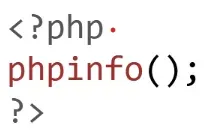
Save this file and access it in your browser. It provides detailed information about active modules and PHP configuration.
Method 3: Via cPanel
For shared hosting environments, most control panels, like cPanel, provide an option to view and manage installed PHP modules under the “PHP Selector” or equivalent.
Steps to Enable PHP Optional Modules
How you enable an optional module depends on where PHP is running, so start by identifying your environment.
Identify Your Hosting Environment
The steps for enabling modules vary depending on your hosting environment:
- Shared Hosting: Configuration is typically done via cPanel or Plesk.
- Dedicated/VPS Hosting: Direct server access is required to modify configuration files.
- Docker Environments: Modules must be preconfigured in the Dockerfile.
Enable Modules in the php.ini File
The php.ini file is central to PHP configuration. To locate it, run:
- php –ini
Editing the File
- Open php.ini in a text editor:
- nano /etc/php/8.0/apache2/php.ini
- Uncomment the required module by removing the semicolon (;). For example:
- ;extension=curl
- Change it to:
- sudo systemctl restart apache2
How to Enable PHP Optional Modules on Different Operating Systems
Linux
Steps to Install and Enable Modules
- Install the required module:
- sudo apt-get install php-[module_name]
- Enable the module:
- sudo phpenmod [module_name]
- Restart the web server:
- sudo systemctl restart apache2
Common Modules on Linux
-
- pdo_mysql: For MySQL database integration.
- curl: For fetching data from APIs.
- mbstring: For handling multibyte strings.
Windows
On Windows, PHP modules are typically managed via the php.ini file located in the PHP installation directory. Steps to Enable Modules
- Open the php.ini file.
- Find the module line (e.g., extension=gd) and uncomment it.
- Save the file and restart your web server, such as Apache or Nginx.
Common Modules on Windows
- intl: For internationalization support.
- openssl: For secure communication.
- soap: For interacting with SOAP-based web services.
macOS
macOS users often rely on Homebrew to manage PHP installations and modules.
Steps to Install Modules
- Install the module via Homebrew:
- brew install php-[module_name]
- Restart the PHP service:
- brew services restart php
Best Practices for Enabling PHP Optional Modules
Audit Modules Regularly
Regularly review which modules are active to ensure optimal performance and security.
Use Docker Containers for Testing
Run PHP with isolated modules in Docker environments to test compatibility and functionality before deployment.
Document Changes
Maintain detailed records of any changes made to the PHP configuration to simplify troubleshooting in the future.
Enabling PHP Modules for Multi-PHP Environments
If your server supports multiple PHP versions, managing modules for each can be complex.
Steps for Multi-PHP Management
- Install specific PHP versions using package managers like apt or brew.
- Enable the required modules for each version.
- Use a configuration tool, such as update-alternatives, to switch between PHP versions seamlessly.
Use Cases of Popular PHP Modules
Web APIs and Microservices
Modules like curl and json enable seamless communication with third-party APIs.
Image Processing
Modules such as gd and imagick are used to generate thumbnails and manipulate images dynamically.
Database Management
Modules like mysqli and pdo allow efficient database integration for e-commerce and CMS platforms.
Secure Transactions
The openssl module ensures safe data transmission, critical for financial and healthcare applications.
Security Considerations When Enabling PHP Modules: How to Enable PHP Optional Modules
- Avoid Unnecessary Modules: Every enabled module introduces potential vulnerabilities. Remove any modules not in use.
- Keep Modules Updated: Regular updates patch security loopholes and ensure compatibility with modern PHP versions.
- Monitor Server Logs: Analyze server logs to detect issues or vulnerabilities caused by specific modules.
- Use Only Trusted Sources for Installation: Always install PHP modules from verified repositories or sources to prevent introducing malicious code into your system.
Understanding how to enable PHP optional modules with these security considerations ensures your applications remain robust and secure against potential threats.
Troubleshooting Common Issues with PHP Modules
Learning how to enable PHP optional modules can sometimes present challenges. Addressing these issues effectively ensures a smooth development process and optimal performance for your applications.
- Module Not Found: Ensure the module is installed and listed in the php.ini file. Use commands like phpenmod for Linux systems to enable it.
- Compatibility Issues: Check the compatibility of modules with your PHP version. Updating PHP might resolve such conflicts.
- Server Not Restarting: Ensure all changes in the php.ini file are correctly formatted before restarting the server.
- Missing Dependencies: Some modules require other packages to function correctly. Use the package manager (e.g., apt or yum) to check and install the required dependencies.
Mastering how to enable PHP optional modules and troubleshooting potential issues ensures a seamless integration process and enhances application performance.
Real-Life Applications of PHP Optional Modules

E-Commerce Platforms
E-commerce platforms rely heavily on PHP optional modules for seamless operations. For example, pdo_mysql ensures efficient database management, while curl enables real-time product data retrieval. Learning how to enable PHP optional modules like these ensures smoother inventory management and transaction processing.
CMS Development
Content Management Systems (CMS) utilize modules such as xml and mbstring to handle diverse data formats and support multilingual content. Understanding how to enable PHP optional modules for these functionalities is vital for building scalable, multilingual websites.
Enterprise Applications
Enterprise-grade systems often demand high security and advanced integrations. Modules like openssl and soap play a crucial role in secure data processing and third-party service integration. Mastering how to enable PHP optional modules for such use cases empowers developers to create robust and secure systems.
Web Scraping and Data Aggregation
PHP modules like curl and dom are widely used for web scraping tasks, enabling developers to gather and aggregate data from multiple online sources efficiently.
Dynamic Media Management
Modules such as gd and imagick are critical for generating dynamic content like image thumbnails, watermarks, or complex image transformations in real-time applications.
API-Driven Applications
Building API-driven web applications often involves modules like json for seamless data exchange and curl for interacting with external services, enabling fast and secure API integrations.
Custom Reporting Systems
Modules like zip and pdf allow the generation of custom reports in various formats, supporting robust reporting systems for financial, business, or analytics dashboards.
Educational Platforms
Modules like mbstring for text processing and mysqli for robust database management are indispensable for online learning platforms that store and display large amounts of user and course data.
Maximizing PHP Development with Optional Modules
PHP optional modules play a pivotal role in enhancing your development workflow and project outcomes. By enabling the right modules, developers can optimize performance, ensure security, and integrate advanced functionalities with ease. Understanding how to enable PHP optional modules is crucial for unlocking these benefits, as it allows for a customized setup that meets specific project requirements. Whether you're building e-commerce platforms, dynamic web applications, or enterprise-grade systems, these modules provide the flexibility and power needed to meet diverse project needs. Additionally, learning how to enable PHP optional modules ensures better compatibility with specific frameworks, streamlines database connectivity, supports secure communications, and simplifies dynamic content generation. This adaptability makes PHP an even more robust choice for creating scalable and high-performance applications.
Conclusion
Mastering how to enable PHP optional modules is essential for PHP developers aiming to build powerful, secure, and efficient applications. By following this guide, you can enhance your development capabilities, troubleshoot common issues, and optimize your projects for various industries. Whether managing a single website or deploying a complex enterprise system, understanding how to enable PHP optional modules equips you to tackle any challenge with confidence. Take your development expertise to the next level by thoroughly exploring how to enable PHP optional modules and ensuring your applications meet diverse requirements effortlessly. For more information, check out the official PHP documentation or consult resources like Ubuntu’s PHP guide and Homebrew’s official site.


